Before checking in, don't forget to ensure your passport is up to date with the latest requirements and is valid for your trip. You can check the entry requirements for your destination on the gov.uk website.
If you've reserved a seat for an additional fee, you can check in to your flights from 15 days until 1 hour before departure. If you haven't reserved a seat, you can check in online from 48 hours until 1 hour before departure.
You'll need the passport details for every passenger on the booking to complete check-in, so it's worth having everyone's documents to hand before you start.
You can check in on the airline's website or app. First, you'll need two things:
- Your Aer Lingus e-ticket reference — an 8-character code shown in the flights section of your Heidi MyBooking portal, and on your booking confirmation document. You can find our guide for logging into your MyBooking portal here.
-
The lead passenger's surname — the first person listed in your Heidi MyBooking portal, and on your confirmation document.
On the website:
- Go to Aer Lingus Manage My Booking.
- Select the "Check in" option.
- Provide the family name of the lead passenger on your booking and the Aer Lingus e-ticket reference.
- After entering each passenger's passport details, you'll be checked in and Aer Lingus will let you print your boarding passes or save them to your device.
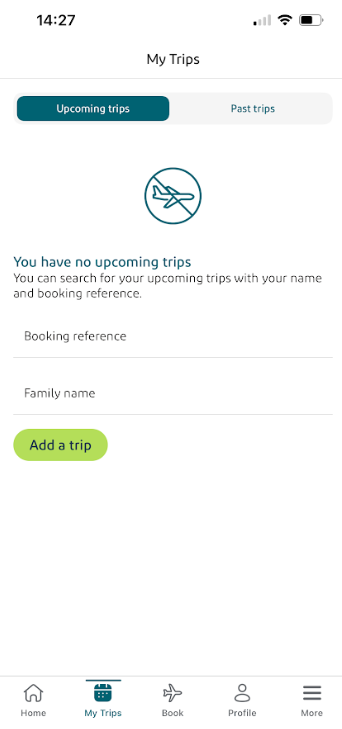
On the app:
- If you're automatically signed in to a personal account, sign out first.
- Press "My trips"
- Enter your E-ticket reference and the lead passenger's surname.
- Enter each passenger's passport details to complete check-in.
Please follow the screenshots below: